Note: This documentation is for Windows only and should only be used if you are experiencing issues with the automatic dependency installation that occurs during the installation process of the Methodius AI Desktop executable.
When installing Methodius AI Desktop on Windows you may have been notified that external dependencies were missing. This is because Methodius AI Desktop uses a local LLM powered by Ollama (opens in a new tab) which requires some additional dependencies to be installed on your system. Since we do not include these dependencies in the Methodius AI Desktop executable to keep the file size small, we download them from a hosted S3 bucket during the installation process.
If you are in a geographic region that is restricted from accessing the S3 bucket automatically during the installation process (like VPN related), you can manually install the dependencies using the below instructions.
Manual Dependency Installation
Download the Dependency Bundle
We are currently on Ollama 0.5.4
Download the [bundle](https://cdn.Methodius (opens in a new tab) AI.com/support/ollama/0.5.4/win32_lib.zip) from the Methodius AI S3 bucket.
direct link: https://cdn.Methodius (opens in a new tab) AI.com/support/ollama/0.5.4/win32_lib.zip
Extract the Dependency Bundle
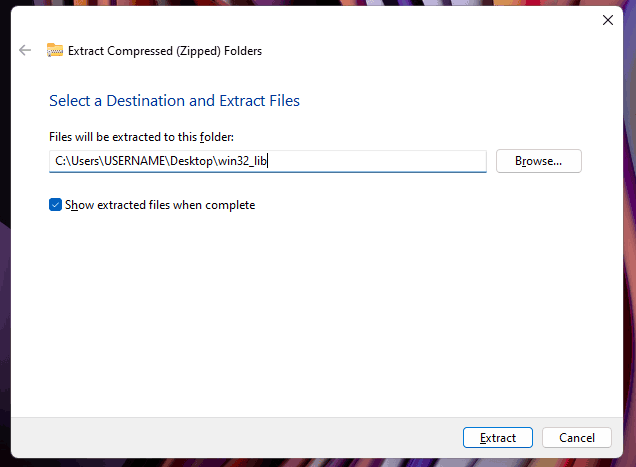
Right-click > Extract files to a folder called win32_lib on your desktop. It should suggest this default folder name.
Copy the Dependency Bundle to the Methodius AI Desktop Application
Open the Program Files for the installed Methodius AI Desktop application. This is typically located at C:\Users\USERNAME\AppData\Local\Programs\Methodius AI.
Open the resources/ollama folder inside the Methodius AI Desktop application folder.
Open the win32_lib folder created during the extraction of the zip file. Inside this folder you will see a folder called lib.
Copy the lib folder and paste it into the ollama folder inside the Methodius AI Desktop application folder.
You should now be able to run the Methodius AI Desktop internal LLM with full GPU,CPU,NPU support.
Alternative: Install Ollama Directly
If you cannot unable to access the S3 bucket at all on your internet connection, you should just install Ollama (opens in a new tab) directly and select that LLM as your provider in Methodius AI.